Showing posts with label FaceTime. Show all posts

Monday, September 30, 2013

Trouble with iMessage, FaceTime or Push Notifications?

There have been some anecdotal reports online that have indicated issues with iMessage on iOS. Below I have a few fixes that may correct the problem. I ran into this personally with one iPad and one iPhone in the last few weeks. Both times I had to resort to deactivating and reactivating. 

Some users have reported that turning their iOS devices off and back on fixes the problem, while others indicate that the solution has not worked for them. In testing with my devices experiencing difficulties, the following steps didn't fix the issue but could and are simple: 

1. Turn off iMessage in Settings > Messages 
2. Reset networking settings in Settings > General > Reset 
3. Reenable iMessage in Settings > Messages 

iMessages do not appear to be failing back to SMS when this happens either. They just eventually appear as a failed to send in iMessage. Or if it is right after an update awaiting activation will appear in the iMessage and FaceTime System Preferences panel. 

If these procedures above don’t work. Download Red Sn0w to your computer and perform the following steps:


1.) Connect device via USB cable
2.) Open RedSn0w
3.) Click on Extras
4.) Click on Even More
5.) Click on Deactivate
6.) Phone will show activation screen again. Open iTunes on the computer
7.) iTunes should detected the device and attempt to activate it. 
8.) Device will reactivate with new tickets and Push, iMessage, and FaceTime should go back to normal. 

Hopefully this should resolve any issues you may have with iMessage or FaceTime. 

Saturday, October 30, 2010

Apple's Back To The Mac Presentation

Business

Apple's CFO Peter Openheimer reported that Apple had it's 18th record breaking quarter in a row. With the sales of iPad, iPhone, and Mac they posted earnings of 20 billion. The Mac is still 30% of that business and even if Apple were to separate out the Mac from their other businesses the Mac business would still be in the Fortune 500. He immediately said they would not do such a thing. Apple, as a company, has had a string of hits and have gone from a company 10 years ago where Michael Dell stated Apple should close their doors and give the money back to the share holders to the second largest US Company in terms of market cap, the fourth largest manufacturer of cell phones displacing RIM for the fourth place slot, even beating Microsoft in fourth quarter earnings this week.

Half of the people buying Macs are first time buyers and are buying Macs because they like the iPhone and the iPad. From the rest of us long time members of the Mac community; welcome. I suspect Apple's next bold move will be s shot at moving into the enterprise where currently 60% of Fortune 100 companies are exploring how they can use the iPad in their business. Apple has beefed up it's business consulting staff so it is only a matter of time before Apple comes knocking at Microsoft's last major strong hold.

iLife

Recently Apple held an event on the the Apple Campus in Cupertino where they gave us a sneak peak at an updated OS, iLife, new hardware and software and below are just some of my impressions of these.
Screenshot2010-10-30at3.25.01PM-2010-10-30-15-16.png

iLife 11 has some nice new features but it isn't the ground breaking app I was hoping to see. We still have nothing new for producing epubs and the next generation of ebook. They didn't even seem to touch iWeb or iDVD. In fact iPhoto just got a full screen mode, a couple of really cool new slide shows and some nice new book, card, and custom calendar options along with a revamped store to build and buy them in. GarageBand and iMovie seemed to get all the attention on this version. It is nice they got updated but how many people use iMovie and GarageBand on a daily basis? One interesting feature in iMovie is the ability to upload to MobileMe, Facebook, YouTube, Vimeo or CNN iReport right from the application. This could cause another explosion of user generated content like adding the video capabilities to the iPhone. My question is when will the iMovie iPhone application get the same treatment. News reports could be shot and edited on scene and uploaded to the news bureau instantly. The new iLife is also Snow Leopard only so if you still own a G5 or haven't moved up to Snow Leopard for some reason you have to do that first.

While Apple has made a huge push to converting their entire platform to 64 bit, iLife is still being shipped as a 32 bit apps and can't really take full advantage of all the RAM our computers have to offer now. The apps are fast don't get me wrong but we wouldn't be Apple fans if we didn't want more.

I think most of us old time Mac fans are still looking for the
Knowledge Navigator from 1985 that was envisioned years ago and a video was created to show what computing would be like in the future.

FaceTime

Apple has also released a beta version of FaceTime on the Mac as a standalone application. First I think it is a standalone application so that it can be ported to Windows when it is finished on the Mac. The application is still in beta no release date has been officially given yet. I have tested placing calls from the Mac to iPhones and have received calls as well. FaceTime isn’t exactly feature rich yet and has a way to go on deciding where to send a call. If I am at my computer and someone calls my iPhone I would rather the call go there or give me an option to transfer the call between devices.


Screenshot2010-10-30at3.22.23PM-2010-10-30-15-16.pngJobs did promise when the iPhone 4 was introduced that millions of devices would have FaceTime by the end of the year and he was right. I am using FaceTime a couple of times a week to talk to people. Once you open FaceTime you can register one or more email addresses for people to call you on. FaceTime can ring to your computer even when the application is closed. When a call comes in FaceTime opens and displays who is calling along with a preview of what the caller will see if you answer.

FaceTime still needs some smoothing over and some additional features but the minimal interface and video quality are both quiet good. I would like to have an announcement of who is calling instead of just a ring and I would like to see FaceTime work over 3G networks so I can make or receive FaceTime calls anywhere, anytime. I would also like to transfer a call in real time between my iPhone, MacBook Pro, or in the future iPad when it gets a forward facing camera.

OS X Lion

OS X Lion was a bit sketchy on details and Apple did not announce any ground breaking changes. We are now just getting more support for gestures and some of the things Apple learned about in iOS is being brought back to the Mac.

First Mission Control is integrating expose, dashboard, and spaces into one easy to use gesture based system. I think while this is mostly UI polish it has the potential to improve my day to day work flow and reduce some of the window clutter that can distract me and keep me from completing tasks. With a click of a button I can make app full screen to work undistracted. However with a swipe gesture I can jump to another full screen app or back to my windowed desktop. Another swipe and all my windowed apps group by type and group with each other so I can look at them quickly and easily. Another gesture and my widgets slide in at the ready.

Screenshot2010-10-30at3.24.25PM-2010-10-30-15-16.pngApple added expose in 10.3 to deal with Window clutter and dashboard in 10.4 to give us access to small specialized Programs called widgets. I see these features hardly used with a lot of Mac users I work with and I believe this is Apple's attempt to move these apps into the main stream.

Next up is LaunchPad. It looks like the home screen on the iPad or iPhone. Which begs the question do we need another app launcher? To date we have the dock to place apps you use all the time, the finder to locate and run rarely used apps, or my personal favorite Spotlight. Just type a shortcut and the first few letters of the app name and press enter. Now we are getting another new gesture and LaunchPad flies in and we can interact with the apps the same way we do on the iPad. This could help reduce some clutter in the dock and organize apps a bit better. I just would like to see them come up with an easier method to rediscover an app I already have. Many times someone has asked me about an app or I have needed to perform a task and just couldn't remember the name of the app I wanted. We almost need an app to keep track of our apps, particularly the ones we use infrequently.

The next item up and the one that will and is creating the most up roar in the Apple community is the Mac App Store coming to Snow Leopard sometime in January. Just early this year it was reported that the next version of OS X would have an app store and only approved apps would be allowed on the new OS. To which in a short Steve Jobs email he replied no. Now two questions were asked, and only one answer given. Now at the Back To The Mac event we get a cleared picture. Yes, we will have an app store and no users will not be restricted to loading only software purchased from there. So geeks breath a sigh of relief, nothing is changing for you except a reduction in confused calls from family and friends on how to install a piece of software. Now they can just open the app store click on an app and find it in the LaunchPad ready to go. No more mounting disk images and running package installers or dragging to the Applications folder. Unless of course that us the only way the app is offered.

Also important to users, no more tracking serial numbers, locating DVD's or hours of reloading software should you need to reinstall. Making it as simple to reset your desktop as your iPhone or iPad is today. With cloud based backup solutions we can see a day when you could reformat your computer auto re download your apps and pull your data back from the cloud.

This is totally optional for developers and is going to be huge for small developers. Access to a store where all of your potential customers visit. Able to sell at lower prices because piracy has been greatly reduced. No dealing with software keys to lock your application. This can be a biggest thing to happen to small developers ever. As a new developer I am looking forward to publishing on the Mac App Store it just seems like a simple choice.


One more thing...
Screenshot2010-10-30at3.20.41PM-2010-10-30-15-16.pngThe MacBook Air looks awesome. I use my MacBook Pro for coding and website design and my iPad for writing, surfing, and email I don't expect to run out and get an AIr but I do see what the fuss is about. It is small, light, ultra portable, and fast enough for what 95% of users want to do. It looks good for casual games, surfing the web, and light content creation. The flash based storage isn't huge but with large USB drives and cloud storage options popping up all the time the limited Flash based hard drive 64-256 GB isn't really an issue. If I did't already own a 17" MacBook Pro I would consider the Air for a first Mac. The Air seems to be Apple's foray into the Premium net book market. With a $999-$1,599 price point it isn't cheaper than other net books but it is far more capable. Intel Core 2 Duo CPU, 2 Gigs of RAM and large flash storage makes it a fast and small machine. The MacBook Air will be a must have for the back to school crowd and people with light to moderate computing needs. The lack of optical drive option did prompt Apple to include a small USB key for software restore. I hope to see this become the standard for software restore on all computers. It is more convenient than disks just pop it into the USB port and reboot.

Overall it was a good presentation from Job’s and team, I do expect we will hear more about Lion in the coming months leading up to it's summer release. I hope we see quiet a few more new features to make our OS more ready for the enterprise, more user friendly, and more powerful than ever before. Apple is now 10% of the PC market and 20% if you count the iPad as a PC. That growth is only going to continue upwards for the foreseeable future. It is really an exciting time to be a Mac fan and even more exciting to be a Mac developer.

If you are one of those who are new to the Mac again; welcome! To get the most from your Mac and iOS devices seek out a Mac User Group in your community. Other Mac users are always happy to share information and teach one another about our favorite software.

Sunday, June 27, 2010

iPhone 4 First Look

In 2007 Apple changed the smart phone market with the first iPhone. In 2008 they revised the iPhone and rolled out the App Store and developers responded by creating more than 200,000 applications to date. in 2009 the iPhone added video recording, got faster, more memory and a few other new features but nothing earth shattering. Now in 2010 Apple really did redefine the smart phone market again with iPhone 4.

The first thing you notice on the iPhone 4 is the weight of the handset when you first pick it up. The weight feels perfect it is more of a substantial tool than just another phone. The glass and metal looks like art, the feel is solid, and it is very comfortable in your hand.

route-retina-20100607-2010-06-27-18-00.png


The first thing you notice when turning the phone on is the new Retina Display is stunning. The higher resolution and In Plane Switching LED display lights up fast and is very bright even in direct sunlight making it easy to read. The 326 pixels per inch make the pixels so small most people can’t see them and images and text look like laser prints instead of images on a screen. None of the online photos did justice to the clarity of this new display. So far no other smart phone maker is using a screen with this many pixels per inch.

Once you swipe your finger to unlock the phone you get a feel for the speed of the A4 processor and the benefit of putting 512 Megabytes of RAM into the phone. While we didn’t see an expected jump in storage capacity the extra speed makes the phone far more capable than it’s predecessors. Even the 3G and WiFi is faster on this new phone requiring you to wait less time to download information and there is plenty of room for network performance to improve as AT&T upgrades its network.

Pictures and Video are amazing on this phone putting it nearly on par with higher resolution point and shoot cameras. The 5 megapixel sensor using larger pixels making it more sensitive to light takes great photos in lower light conditions and the bright LED flash on the camera helps with even the lowest lighting situations. More megapixels doesn’t always mean better images just bigger files. The camera can also shoot very clear 720p HD video so you can now leave the Flip cameras at home and use your iPhone to shoot, edit and upload videos right from your phone. If you are going to be shooting longer videos you may still want to bring the FlipHD camera along so you don’t use up all of your storage on your phone. With Music, HD Movies, Data, applications, books, PDF’s and Podcasts it seems as though the 32 Gigs of storage goes pretty quick.

The larger battery and more efficient A4 processor has helped the iPhone 4 battery life quiet a bit. Despite the fact I use the phone more and for longer periods of time I can make it through an entire day and not have to recharge the phone. Under very heavy usage on a Friday I got about 15 hours of usage before needing to recharge. Some of that time was a 2.5 hour Plants vs. Zombies marathon. On Saturday I spent a lot of time on the phone and using bluetooth as well as watching videos and showing off the phone to friends and I got another 15 hours of usage and without the gaming marathon the battery still had about 30% charge remaining when I started recharging it. I didn’t get the kind of battery life Engaget described but I had the bluetooth, wifi, 3G all turned on. With a little power management or just recharging while I am in my car or at my desk I don’t think battery life will ever be a problem again for the iPhone.

There has been some controversy surrounding the iPhones new antenna built into the frame of the phone and the talked about iPhone “Death Grip” that supposedly makes you drop calls. First I tested this at home with the bumper case removed from my phone and was unable to duplicate the issue. I live in a neighborhood that is close to an AT&T cell tower and I get 5 bars no matter what I do in the house. If I move to a location where I only have three bars and try this I do see a drop in signal strength but I am not sure if it is because of how I am holding the phone or other factors in the environment that might be influencing the phone. This isn’t a new phenomenon. All cell phones loose reception when you cover the antenna with something that can block signals like your hand or your head. To make sure I don’t have a problem and to protect my phones glass surfaces I opted for the Bumper case and in four days of using my iPhone I haven’t had a dropped call yet which says a lot since that has been a problem with AT&T for many years.

route-multitasking-20100607-2010-06-27-18-00.png


With iOS 4 on the iPhone we now have multitasking. While for the last couple of years I didn’t think I needed multi-tasking it is again a time saver. Saving the state of the application when I switch to something else and letting me come back right to where I was when I return saves me time in waiting for the application to be ready to go again and doesn’t compromise battery life. Also adding folders allows us to install more applications on our phones without loosing having some applications only available through a spotlight search. Initially the iPhone could support 144 applications. Then iPhone OS 3 came out and we could go up to 176 applications plus the ones that didn’t fit on a screen could be accessed from Spotlight. Now with folders we can have 2,112 applications visible on our phones. Again if you have more than that first of all how do you use them all and second you can find the ones not visible through a folder in Spotlight.

The background images you can choose for your lock screen and your desktop really give you something nice to look at while you are using your phone.

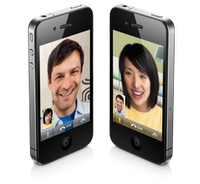
One of the most compelling and phone new features got a lot of ridicule from the tech and blog community when it was first announced and everyone criticized and said “who would want to video conference from your phone?” But now we have Face Time. While you are on a WiFi network you can call another iPhone 4 user and see them face to face and carry on a conversation with that person. It is great to see someone when you are talking to them and over WiFi the video is clear and the audio quality is excellent. You can even switch from the front to the rear camera at the touch of a button to show the caller what you are seeing or press it again so they can see you. The era of the Jetson’s have arrived. While we still don’t have our flying cars we do finally have an easy to use video chat. Apple has submitted Face Time to become an open standard and already relies on other open standard protocols to work. Now Apple needs to make Face Time work not with just iPhone4 but with iChat AV and encourage other vendors like Skype, AIM, Microsoft, and others to adopt Face Time as a standard and use an Open Directory system to allow us to talk with one another.
route-facetime-20100623-2010-06-27-18-00.png


The potential for our communication to be revolutionized if anyone, anywhere and see and hear each other anytime, whether we are at our computers on our desks, our laptops in a cafe, or our iPhones at the beach. To be able to look someone in the eye and have a conversation even if they are thousands of miles away is a very powerful tool. Plus when you look our caller in the eye you know they are paying attention and not distracted by one of the many other devices that now vie for our attention in our lives today.

iBooks now runs on iOS4 and on the Retina Display on the iPhone4 it is easy to sit and read a book while having lunch or standing in line. The text is so clear and easy to read even at smaller font sizes it is no problem to look at the screen for long periods. When I got my first Amazon Kindle last year I started reading more because it was easy to carry several books around in a small lightweight device. A year later the iPad was introduced and then I could do far more than just read books and now with the iPhone supporting iBooks I can read anytime anywhere even if I didn’t bring my Kindle or iPad along with me. I can open any electronic book in my library read a few pages and when I get back to my Kindle or iPad they update to the most current page I have read and I can pickup where I left off. Just like with Podcasts, Movies, and AudioBooks on iTunes, iPad, and iPhone.

In short the iPhone4 has revolutionized Smart Phones and mobile communications again and it will likely be sometime before handset manufactures catch up to Apple again. By then who knows what will be coming next but stay tuned and we will find out.

Apple TV

The more I use the new Apple TV the more I like it. The previous model was likable and easy to use but we had no options for live content. N...