Showing posts with label Mac OS X. Show all posts
Showing posts with label Mac OS X. Show all posts
Friday, February 12, 2010
MacGourmet Deluxe Review
The MacGourmet Deluxe is iTunes for recipes. It is a easy to use Kitchen Management System for the rest of us. With a few simple controls across the top of the Window and a simple search bar allowing a search on any or all fields to find the recipe you are looking for just like your music.
This is a very powerful and easy to use tool for storing recipes, planning menus, building cookbooks, managing nutrition or anything else an amateur or professional epicurean can dream up.
With user created Recipe Books and Smart Recipe books you can store your recipes in any way you like or have the computer keep track of recipes based on the criteria you set. One of the default smart recipes books is Recipes I Have Prepared. So you can mark an item as prepared so you can track what you have made in the past.
MacGourmet comes with some recipes already built in and you can always add your own recipes or click on the Featured section to find new recipes from Mac.Gourmet.com. If you find a recipe on the web you like. Just highlight it, click Services, Mac Gourmet, and Make a Text Clipping and the whole recipe is immediately stored in your Clippings folder and can be imported as a recipe card any time. The import is not an automatic process it requires highlighting sections of the clipping and identifying it to the application but at least you don' have to retype anything.
The application also includes the ability to store notes about foods and wines you have eaten, keep historical shopping lists and make notes on where you can pick up those hard to find items. This program is a gastronomic diary for the food and drink lover in you.
MacGourmet also supports the creation of shopping lists based on the recipes you select so you can just pick your recipes print your shopping list and head out to the store. This makes the shopping task much simpler if you sit down and use the built in meal planner, you can plan your meals, build your shopping list and access the recipe when you need to prepare the meal all in one easy place. For an additional $4.99 you can also add the iPhone or iPod touch application to your phone and share the recipes and lists between your desktop and handheld device. I think for deluxe they should include the iPhone app for free.
MacGourmet also lets you share your recipes on your MobileMe website right out of the application or send the recipe to friends via email. There is Bonjour sharing component built in for those who have multiple Macs at home and you want to share recipes between them.
Once you are ready to head to the kitchen you have a few options. The iPhone or iPod Touch add on app for $4.99, print the recipe on paper, or take your laptop to the kitchen and click on the Chef View. This gives you a large print view you can read at a distance to keep your Mac clear of the work area and out of harms way while still making the recipes readable at a distance.
The application has a lot of power available but it does have a few shortcomings. All of this data is of course stored locally on your PC but doesn't include a conduit for MobileMe syncing of its database. So make sure you use a backup program so you don't loose your recipes and notes in the event of disaster. Not including the iPhone app is a little disappointing. I would love to be able to plan a meal and send the shopping list right to my iPhone or the iPhone of whomever is doing the shopping. Not being able to send the list directly to email is a bit of a let down as well. Mac Gourmet could benefit from some additional online access to list and store new recipes. Perhaps Amazon could add some e-cookbooks for a low price to add to collections as well as a free downloadable web standard for recipes so surfers can just click and cook.
This app is flexible and allows you to use as many or as few of the features as you like. It is only limited by the imagination and training of its user. I know this tool is a must have for this tech geeks kitchen.
Pros:
Easy to use familiar interface, lots of great features for the diet conscious, and comes with some great tasty recipes.
Cons:
The iPhone App should be free for deluxe users, Easier import method for online recipes, a scanning feature to scan in existing paper recipes are definitely lacking.


Wednesday, August 26, 2009
Using iTunes U
One of the great secrets of iTunes seems to be the iTunes University. iTunes U is a huge selection of classes that are available from Universities all over the world. The classes are all free to download and are in Video or Audio format and some even include PDF's of the presentations.
The early classes were mostly technology related but now almost every topic is covered and available for download. If you are looking for something new to learn for the sake of learning or you are a student looking to get a jump on classes you are planning to take, or a little older and just want a refresher of classes you have taken before iTunes U is in amazing resource.
This has the ability to change the face of education. Imagine learning a
bout subjects from the leaders of their field no matter where you live. You just need a computer, an internet connection and iTunes.
So here is how you get to iTunes U in three easy steps.
1st download iTunes from www.apple.com/itunes
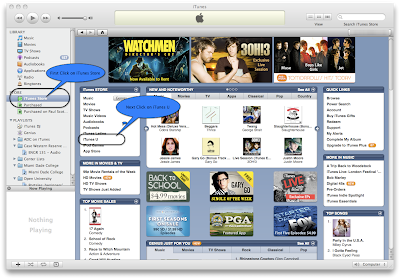
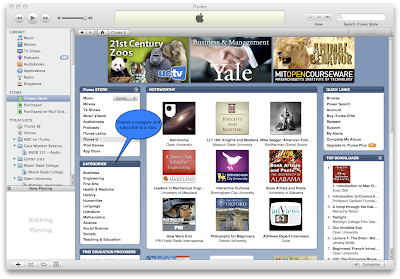
Now you are off and learning form the top teachers and some of the top schools in the country from the comfort of your own home and it is totally free. This is great for kids to discover new interests and get ahead in school.
Wednesday, July 22, 2009
Is Your Mac Ready for Snow Leopard?
So with Snow Leopard just over two months away is your Mac ready? Apple's guidelines for the new OS are fairly simple. Your Mac must have an Intel Processor, 1 Gigabyte of RAM, 5 Gigabytes of free disk space, and a DVD drive to install the disk.
All Intel Macs sold from May 2006 on are all able to run Snow Leopard. Depending on how old your machine is will determine the number new features which you can take advantage. For instance the first Macbooks, and iMacs sold from May - Nov of 2006 had Intel Core Duo Processors which had 32 bit CPU's. You can install and run Snow Leopard and you will get a performance gain but you will not get as dramatic a gain as you would on a 64 bit Mac sold after November 06 which was designated as a Intel Core 2 Duo. The Mac-mini was Intel Core Solo and Core Duo from May 2006 - August 2007.
To check which Processor you have in your computer Click on your Apple Menu, go to About This Mac, and look at the Processor line. If you have PowerPC you can not upgrade to 10.6 Snow Leopard. If you have an Intel Core Duo or Core Solo you can run the upgrade but can't take full advantage of the new 64 bit system.
Also on the next line down it will tell you how much RAM you have in your system remember 1 gig is the minimum. RAM is cheap now and upgrades are fairly simple on most Macs. I would recommend putting in as much RAM as your system can support and you can afford. You can never have too much RAM.
Hard Drive space is important. You need to have at least 5 Gigabytes free to do the installation but once the installation is done you will recover some space on your hard drive. According to Apple’s Specs possibly as much as 6 Gigabytes. Once this is done you can also use a program like Drive Genius 2 to remove the PowerPC code from your Applications and save more space.
Hard Drives are not that expensive anymore and hard drive upgrades on the Mac are fairly straight forward. The newer Macbooks and Macbook Pros pre Uni-body model have a lot of screws to remove to get to the hard drive so be careful and make sure you keep track of the screws. I will cover hard drive replacement in a future post.
For those with Macs that are pre Uni-body it seems the only feature we don't get with Snow Leopard is hardware H.264 decoding. The CPU can handle the decoding but hardware decoders are always more efficient and free up your CPU for other tasks.
For all Intel users this is going to be a good upgrade for improving performance in virtually every area of the system and making small visual enhancements. This is a bargain for the $29.00 price tag as well as getting us ready for whatever Apple has in store for us next with 10.7. in the next 18-24 months after Snow Leopard ships.
If you are on a PowerPC system and are starting to think about an upgrade of your Macbook, Macbook Pro, or Mac-Mini, or PowerMac computer now is the time! The Snow Leopard upgrade will only cost you 9.95 and you can start enjoying the added performance from the newer video cards, faster CPU's, and larger Hard Drives.
If you are on an PowerPC iMac I would wait until after October to upgrade. The rumor is new iMacs will be coming soon and then your machine will ship with Snow Leopard.
All Intel Macs sold from May 2006 on are all able to run Snow Leopard. Depending on how old your machine is will determine the number new features which you can take advantage. For instance the first Macbooks, and iMacs sold from May - Nov of 2006 had Intel Core Duo Processors which had 32 bit CPU's. You can install and run Snow Leopard and you will get a performance gain but you will not get as dramatic a gain as you would on a 64 bit Mac sold after November 06 which was designated as a Intel Core 2 Duo. The Mac-mini was Intel Core Solo and Core Duo from May 2006 - August 2007.
To check which Processor you have in your computer Click on your Apple Menu, go to About This Mac, and look at the Processor line. If you have PowerPC you can not upgrade to 10.6 Snow Leopard. If you have an Intel Core Duo or Core Solo you can run the upgrade but can't take full advantage of the new 64 bit system.
Also on the next line down it will tell you how much RAM you have in your system remember 1 gig is the minimum. RAM is cheap now and upgrades are fairly simple on most Macs. I would recommend putting in as much RAM as your system can support and you can afford. You can never have too much RAM.
Hard Drive space is important. You need to have at least 5 Gigabytes free to do the installation but once the installation is done you will recover some space on your hard drive. According to Apple’s Specs possibly as much as 6 Gigabytes. Once this is done you can also use a program like Drive Genius 2 to remove the PowerPC code from your Applications and save more space.
Hard Drives are not that expensive anymore and hard drive upgrades on the Mac are fairly straight forward. The newer Macbooks and Macbook Pros pre Uni-body model have a lot of screws to remove to get to the hard drive so be careful and make sure you keep track of the screws. I will cover hard drive replacement in a future post.
For those with Macs that are pre Uni-body it seems the only feature we don't get with Snow Leopard is hardware H.264 decoding. The CPU can handle the decoding but hardware decoders are always more efficient and free up your CPU for other tasks.
For all Intel users this is going to be a good upgrade for improving performance in virtually every area of the system and making small visual enhancements. This is a bargain for the $29.00 price tag as well as getting us ready for whatever Apple has in store for us next with 10.7. in the next 18-24 months after Snow Leopard ships.
If you are on a PowerPC system and are starting to think about an upgrade of your Macbook, Macbook Pro, or Mac-Mini, or PowerMac computer now is the time! The Snow Leopard upgrade will only cost you 9.95 and you can start enjoying the added performance from the newer video cards, faster CPU's, and larger Hard Drives.
If you are on an PowerPC iMac I would wait until after October to upgrade. The rumor is new iMacs will be coming soon and then your machine will ship with Snow Leopard.
Saturday, July 18, 2009
Mac OS X Under the Hood
Mac OS X Snow Leopard as a mentioned in a previous post (see New Features In Mac OS X 10.6 Coming Soon) we talked about a few of the new features of OS X 10.6 that users will be able to see. Today we are going to talk about what you will not see. Those tweaks and changes under the hood that will make OS X easier to use and faster.
First I should mention in the MWDC 2009 Keynote Phil Schiller noted that the new Snow Leopard would take up less space. With the upgrade the average user should recover about 6 Gigabytes of disk space. I think this is the first Operating System upgrade that actually makes the OS smaller. Due to the lack of Power PC support in this version only Intel machines built in the last few years will be able to run the upgrade and large chunk of the space saved probably comes from removing the old Power PC code from the Operating System.
First and foremost on the behind the scenes changes is Finder is completely rewritten in Cocoa and 64 bit. This means the Finder the first app that launches and gives you access to your files is going to be much faster and more stable. Some of the early indications from Apple indicates it will be on average twice as fast if not a little faster than that.
Making Time Machines twice a fast, for those of you not using Time Machine for backup yet I can't stress enough what a great job it can do of saving you from hardware failures or from accidental deletions or overwrites of files. I have used Time Machine a lot in the past couple of years to recover documents or rebuild whole systems and it has never failed me.
Snow Leopard is also promising faster wake up from sleep, faster shutdown and faster to join networks. This saves time at the beginning and end of your work time with your Mac.
Snow Leopard is also adding a great feature for travelers. The computer can now determine what time zone it is located in and update it's clock automatically using the Internet and Geo Location technologies. Now when you are flying across country your computer can know the local time when you arrive.
Better support for selecting text in PDF's has now been added so if you have a two column document the computer can select the left column first and the right column after making it easier to copy information from one document to another.
Disk Eject now will tell you if a disk can't be ejected what Application is using the disk so you can close it and then eject your disk.
iChat now allows higher resolution video conferencing with reduced bandwidth cost, a 33% reduction in bandwidth requirements makes it easier to use higher resolutions and continue to do other things on the Internet at the same time.
Other things that users will not see is Grand Central Dispatch and Open CL. These two technologies allow programmers to write apps to take better advantage of the modern multi-core processors in the entire Intel Mac line and Open CL allows programmers to use powerful Graphics Processors to do regular CPU tasks. This allows the Operating System to better utilize the powerful hardware we already have.
Also to make Snow Leopard a better corporate citizen they are now including Exchange Support in Mail, Address Book, and iCal. Now we can use the apps we have known and loved for years with Exchange servers. Allowing users to keep all of our email, contacts, and calendars in one place regardless if the data lives on our Mobile Me or Exchange accounts.
The best news for users of OS X 10.5 Leopard the upgrade is only going to cost $29 and if you bought a Mac after Jun 11th the cost of upgrade is only $10. This is great bargain for everything that is coming with the new version of OS X. Come the end of September Mac users will certainly be seeing a Leopard of another color.
First I should mention in the MWDC 2009 Keynote Phil Schiller noted that the new Snow Leopard would take up less space. With the upgrade the average user should recover about 6 Gigabytes of disk space. I think this is the first Operating System upgrade that actually makes the OS smaller. Due to the lack of Power PC support in this version only Intel machines built in the last few years will be able to run the upgrade and large chunk of the space saved probably comes from removing the old Power PC code from the Operating System.
First and foremost on the behind the scenes changes is Finder is completely rewritten in Cocoa and 64 bit. This means the Finder the first app that launches and gives you access to your files is going to be much faster and more stable. Some of the early indications from Apple indicates it will be on average twice as fast if not a little faster than that.
Making Time Machines twice a fast, for those of you not using Time Machine for backup yet I can't stress enough what a great job it can do of saving you from hardware failures or from accidental deletions or overwrites of files. I have used Time Machine a lot in the past couple of years to recover documents or rebuild whole systems and it has never failed me.
Snow Leopard is also promising faster wake up from sleep, faster shutdown and faster to join networks. This saves time at the beginning and end of your work time with your Mac.
Snow Leopard is also adding a great feature for travelers. The computer can now determine what time zone it is located in and update it's clock automatically using the Internet and Geo Location technologies. Now when you are flying across country your computer can know the local time when you arrive.
Better support for selecting text in PDF's has now been added so if you have a two column document the computer can select the left column first and the right column after making it easier to copy information from one document to another.
Disk Eject now will tell you if a disk can't be ejected what Application is using the disk so you can close it and then eject your disk.
iChat now allows higher resolution video conferencing with reduced bandwidth cost, a 33% reduction in bandwidth requirements makes it easier to use higher resolutions and continue to do other things on the Internet at the same time.
Other things that users will not see is Grand Central Dispatch and Open CL. These two technologies allow programmers to write apps to take better advantage of the modern multi-core processors in the entire Intel Mac line and Open CL allows programmers to use powerful Graphics Processors to do regular CPU tasks. This allows the Operating System to better utilize the powerful hardware we already have.
Also to make Snow Leopard a better corporate citizen they are now including Exchange Support in Mail, Address Book, and iCal. Now we can use the apps we have known and loved for years with Exchange servers. Allowing users to keep all of our email, contacts, and calendars in one place regardless if the data lives on our Mobile Me or Exchange accounts.
The best news for users of OS X 10.5 Leopard the upgrade is only going to cost $29 and if you bought a Mac after Jun 11th the cost of upgrade is only $10. This is great bargain for everything that is coming with the new version of OS X. Come the end of September Mac users will certainly be seeing a Leopard of another color.
Subscribe to:
Posts (Atom)
Apple TV
The more I use the new Apple TV the more I like it. The previous model was likable and easy to use but we had no options for live content. N...

-
 My consulting business has been growing and people are starting to ask if they can pay by credit card. I had a system I setup in 2012 but o...
 -
Normally I just focus on Mac and iPhone tech. However I ran into this problem yesterday and spent hours looking for a solution so I thought...