Since Apple moved the Mac to the Intel Platform we as Mac users can now run just about any software we want. From software for OS X, Unix Programs, even Windows Programs. Let’s see a Windows computer do that quickly and easily. However with these new options come a number of choices for how to run Windows software on the Mac. We have a range a prices and easy of use.
Yes, I know we actually could run Windows on the Mac in the Power PC days using an emulator but emulators were much slower than their real hardware counter parts. For those who remember way back at one point Apple even made a DOS card that could be installed in some 68k Macs and was a PC on card and you could run a Mac program to execute programs on your PC on card but I digress.
Today our leading pay options for Virtualization on the Mac is Parallels and VMWare Fusion. The leading free options are Sun’s Virtual Box and Apple’s Boot Camp. You can also run Windows applications without installing Windows at all by using WINE or CrossOver. We will look at each of these options in turn.
In a recent MacTech Magazine article they compared the performance of VMWare to Parallels. Parallels won in nearly every performance benchmark. Now in order to use VMWare, Parallels, or Sun Virtual Box you have to own a copy of Windows to install. These applications provide a virtual computer to load an OS and your applications into. Parallels and VMWare both have good technical support and the ability to import other virtual machines into them. Today there are a variety of free and for purchase virtual machines you can get on the Internet and install into your Virtualization software. If you want to setup a Web Server on a virtual machine just download one with Linux and Apache pre-setup boot it and you are ready to go. It is great for testing products without impacting the machine you use on a daily basis.
Sun’s Virtual Box has come a long way and is close to being real competition for VMWare and Parallels. It started off as a very basic Virtual Machine lacking even support for external USB hard drives. Now it is a solid performer runs on Mac, Windows, and Linux as much better driver support in version 3 and while still not on par performance wise with VMWare and Parallels it is a fine choice for someone who doesn’t use a Virtual Machine on a regular basis or just wants to run some applications where performance isn’t a huge concern.
WINE and it’s commercial counterpart CrossOver have been around since before Apple went to Intel. Originally WINE which stands for (Wine Is Not an Emulator) was developed for Unix and Linux users to run Windows based apps on their machines without Windows being installed. WINE is a freeware application that is developed and supported by the community. This option is not for the technical novice or the faint at heart. It can be tough to configure and not all applications are supported. There is a commercial version of the software put out by CodeWeavers called CrossOver that is a company supported version of WINE. I didn’t have a lot of luck with it myself when I tired it out in 2007 but it may have progressed since then. I will look at it in a future blog post.
Even Apple has dipped a toe into the fray with OS 10.5 and 10.6 by introducing Boot Camp. This doesn’t technically fall under the realm of virtualization since it is just allowing you to dual boot your Mac into OS X or Windows. This does allow you run Windows apps on your Mac but not while you are in OS X. Parallels and VMWare do provide a way to launch your Boot Camp Windows partition while you are running OS X which just treats the Boot Camp partition like any other virtual machine except it has a real drive partition. Boot Camp requires you to dedicate a partition on your hard drive to running Windows and you may find a time when you just need to run Windows by itself. You do still have to buy a separate copy of Windows though.
So if you are looking to run Windows Applications on your Mac and don’t mind spending a little money a copy of Parallels and Windows 7 is going to give you the best performance and support.
If you are on a tight budget Sun’s Virtual Box and Windows 7 is a good alternative. The performance is still good and you can save the $79.00 by getting a free Virtualization software.
If you don’t want to spend any money to run Windows and have time on your hands to learn a lot about how applications work and interact with the Operating System then the best alternatives I have found have been WineBottler and Wineskin. These two apps take your Windows Application and package them into a Application that can reside in your Applications folder just like your Mac applications. When you launch WineBottler or WineSkin it will run the X11 program that is by default installed on OS X 10.5 and 10.6. For OS X versions 10.3 - 10.4 you may have to go back to your installer CD or DVD to install X11 to make these programs work.
So we have come a long way since the days of a DOS card in our 68k Macs or running Connectix Virtual PC on our Power PC machines. Now with the power of BSD Unix under the hood of Mac OS and an Intel Processor at the heart of our computers Mac users now have the power to run virtually any application or Operating System we might want to right from the comfort of our primary or possibly now only machine. So no matter what software you run or what industry you might be in or what ever you might be studying in school there is a way to configure your Mac to meet your needs today and into the future.
Sunday, March 28, 2010


Friday, February 19, 2010
Mac Battery Health
Most of Macs sold are mobile machines and as a mobile machine we tend to use them when plugging in isn’t convenient. Battery health is an important part of mobile computing. If you don’t have access to power and your battery is dead there isn’t much point in having the laptop.
There are a few ways to check the health of your battery. Third party apps, and built in apps in OS X. First I will start with the third party free ware apps.
Battery Health and Status Monitor from SonoraGraphics http://www.sonoragraphics.com/batteryhealth.html is a great freeware program that will tell you about your batteries original capacity, current capacity and charge cycles.

This gives you a great quick overview of how your battery is doing and if it might need to be replaced.

In OS X 10.6 a new feature was added to the menu bar. If you press
and click on the battery you will get additional information about your battery. In this case it adds Condition and tells you what the status of your battery. The third place you can check for that status of your battery is System Profiler. Open your System Profiler and click on Power and it will tell you everything about the status of your battery and power management settings. If the indicator tells you to replace the battery or it is in a status other than Normal and you have fewer than 300 Charge Cycles on the battery take it into an Apple Store or call Apple Technical Support. they may replace your battery if it is defective. The newer model laptops batteries are typically good for 1000 charge cycles while the older machines are usually good for about 300 charge cycles. I replace my battery typically every two years to maximize my battery life. Now you can get an external power pack with a mag safe connector to allow you to run your laptop between 11 and 26 hours depending on model laptop and model of HyperMac http://www.hypershop.com/HyperMac-External-MacBook-Battery-and-Car-Charger-s/91.htm you are using. It can also recharge iPhones and other USB devices. I know the Mac Geek Gab is doing a little battery survey so pop on over and participate in the survey http://www.macobserver.com/tmo/article/mac_laptop_battery_life_survey/?utm_campaign=shorturl it will be interesting for us to find out how these batteries really work.
Friday, February 12, 2010
MacGourmet Deluxe Review
The MacGourmet Deluxe is iTunes for recipes. It is a easy to use Kitchen Management System for the rest of us. With a few simple controls across the top of the Window and a simple search bar allowing a search on any or all fields to find the recipe you are looking for just like your music.
This is a very powerful and easy to use tool for storing recipes, planning menus, building cookbooks, managing nutrition or anything else an amateur or professional epicurean can dream up.
With user created Recipe Books and Smart Recipe books you can store your recipes in any way you like or have the computer keep track of recipes based on the criteria you set. One of the default smart recipes books is Recipes I Have Prepared. So you can mark an item as prepared so you can track what you have made in the past.
MacGourmet comes with some recipes already built in and you can always add your own recipes or click on the Featured section to find new recipes from Mac.Gourmet.com. If you find a recipe on the web you like. Just highlight it, click Services, Mac Gourmet, and Make a Text Clipping and the whole recipe is immediately stored in your Clippings folder and can be imported as a recipe card any time. The import is not an automatic process it requires highlighting sections of the clipping and identifying it to the application but at least you don' have to retype anything.
The application also includes the ability to store notes about foods and wines you have eaten, keep historical shopping lists and make notes on where you can pick up those hard to find items. This program is a gastronomic diary for the food and drink lover in you.
MacGourmet also supports the creation of shopping lists based on the recipes you select so you can just pick your recipes print your shopping list and head out to the store. This makes the shopping task much simpler if you sit down and use the built in meal planner, you can plan your meals, build your shopping list and access the recipe when you need to prepare the meal all in one easy place. For an additional $4.99 you can also add the iPhone or iPod touch application to your phone and share the recipes and lists between your desktop and handheld device. I think for deluxe they should include the iPhone app for free.
MacGourmet also lets you share your recipes on your MobileMe website right out of the application or send the recipe to friends via email. There is Bonjour sharing component built in for those who have multiple Macs at home and you want to share recipes between them.
Once you are ready to head to the kitchen you have a few options. The iPhone or iPod Touch add on app for $4.99, print the recipe on paper, or take your laptop to the kitchen and click on the Chef View. This gives you a large print view you can read at a distance to keep your Mac clear of the work area and out of harms way while still making the recipes readable at a distance.
The application has a lot of power available but it does have a few shortcomings. All of this data is of course stored locally on your PC but doesn't include a conduit for MobileMe syncing of its database. So make sure you use a backup program so you don't loose your recipes and notes in the event of disaster. Not including the iPhone app is a little disappointing. I would love to be able to plan a meal and send the shopping list right to my iPhone or the iPhone of whomever is doing the shopping. Not being able to send the list directly to email is a bit of a let down as well. Mac Gourmet could benefit from some additional online access to list and store new recipes. Perhaps Amazon could add some e-cookbooks for a low price to add to collections as well as a free downloadable web standard for recipes so surfers can just click and cook.
This app is flexible and allows you to use as many or as few of the features as you like. It is only limited by the imagination and training of its user. I know this tool is a must have for this tech geeks kitchen.
Pros:
Easy to use familiar interface, lots of great features for the diet conscious, and comes with some great tasty recipes.
Cons:
The iPhone App should be free for deluxe users, Easier import method for online recipes, a scanning feature to scan in existing paper recipes are definitely lacking.
Wednesday, February 3, 2010
Why I disagree with "10 Reasons to pass on iPad" and 10 reasons I want an iPad

I read this 10 reasons to pass on the iPad on Tech Republic this morning http://blogs.techrepublic.com.com/10things/?p=1324&tag=nl.e101 and just had to write the 10 things that refute the argument of why to pass on an iPad.
1.) Physical Keyboard, there is an accessory dock that has a physical keyboard or you can connect via a Bluetooth keyboard. (This person didn’t pay much attention in the presentation)
On Screen size the larger size is a convenience that is better than the iPhone for viewing and not as cumbersome as a 17” notebook. As long as the device does some things better than an iPhone and some things better than a laptop around the price of a net book it is going to be a hit.
2.) The Net books don’t have usable track pads and require mice to be attached. Also lack the CPU power and battery life the new iPad offers. IF you want a 10 hour battery your net book would weigh about 3-5 lbs. For 1.5 lbs. you would only get about 2 hours out of it not 10 hours the iPad offers.
3.) Running iPhone OS there is software to allow you to remote control your Mac from the tablet. So you get the Power of a desktop in the palm of your hand through Remote Desktop. iPhone OS is OS X with a touch interface on top. They do restrict what apps can be loaded and only allow what is in the app store but that could be altered in the future and it creates an app ecosystem most developers like and was responsible for the smash hit the iPhone became despite bugs in the process.
4.) There is never enough storage. No matter how much you put in someone will always want more. 64 GB is a good starting point. A net book with more storage would have a mechanical drive or a much more expensive SSD drive. As the price of flash drops and tech improves we will get more storage. The iPhone grew from 8 GB to 32 GB in two years. Two years from now the iPad will probably ship with 256 GB of storage and my laptop will have 2 TB of storage.
5.) Again not paying attention. I don’t have HDMI on my iPhone either but the Dock Connector can output 480p to my Television, and guess what the Dock connector accessory for the iPad can output 720p to a Television via a 30 pin to component video output that will be available day one. I agree not having the camera kind of bites. I was looking forward to video conferencing with it and there is a space for a camera in the hardware but for some reason Apple didn’t include it. It could have been price or another technical issue. It will come in the future I have no doubt. (The iPad SDK includes Frameworks for Camera support in the Address book and other places, as well as Cisco wrote the Cisco Unified Personal Communicator client to use a Camera for their iPad version).
6.) I didn’t know they were going to have a USB adapter for the dock connector. That is kind of cool. Keeping it thin and light they had to leave out the USB. It still has Wi-Fi and Bluetooth. There is no reason you couldn’t access remote storage via Wi-Fi. I have 20 gigs of storage on my iDisk and I bet I will have access to that via the iPad.
7.) Flash card access is available via the dock connector and to keep it thin and light something had to give. Most users wouldn’t use the Flash card slot anyway. You can’t put one in for every format and keep the thing .5 thick.
8.) It costs Apple $259.00 for the parts to build an entry level unit. So if they sell them at cost they could make this guys target price. Acer has already announced they can’t make a competitive product at that price point and make a profit on it so they are not going to even try and compete with Apple. The pricing is really good for the device and you get what you pay for. If you want a low performing slow net book then great spend $299 and use it as a photo frame. If you want fast and do many things including a really sensitive touch screen $499 and you are in business.
9.) It was unveiled a week ago. I am sure third party manufactures will be quick to start making items for the iPad just like they did the iPhone. I have a Belkin Tune Dock in my car, a Kensington charger in the truck, third party headphones for music, cases made by InCase, and a charger/speaker system from iHome. This will happen for the iPad too once it hits the market. How many people really carry spare laptop batteries or phone batteries with them? How do you keep them charged? Currently Mophie makes a Juicepack that plugs into the iPhone and recharges the battery to double the life of your phone. I am sure there will be a Mophie iPad case to allow you to go 20 plus hours and not need to recharge. Then you can recharge your device while you sleep. The iPad CAN run Skype in fact Skype runs on the iPhone so that will be available day one. Flash isn’t available that is correct. HTML5 looks nice and You Tube is already testing it and rumor has it Hulu is heading that way too. I can already view You Tube and UStream on my iPhone without flash. Flash is a processor and battery hog that slows my laptop down when it runs and spins up the fans. Why would I want it on my smart phone or iPad? It is time for the world to move to HTML5 and the iPhone and now the iPad will push that trend along.
10.) Wi-Fi is almost everywhere now so getting access shouldn’t be that tough if you use the Wi-Fi only model. The iPad 3G is unlocked which means ANY GSM providers microGSM card should work in the device. AT&T was just the first one announced, I am sure T-Mobile and others will be along soon. Besides you can also just carry a MiFi device and connect through the Wi-Fi to any carrier you choose and your laptop can get on as well. Sooner or later tethering will come to the iPhone as well and they will likely add a way for Wi-Fi iPad users to communicate with the Internet via the iPhone in their pocket via Bluetooth or Wi-Fi.
Now the 10 reasons I would own an iPad.
1.) Sitting on my desk in a stand it will make a beautiful Electronic Picture Frame for my photos. A Kodak EasyShare 10” Digital Photo Frame is about $175.00
2.) Color Ebook Reader. My Kindle isn’t color but still currently costs about $489.00 for a 9.7” DX model.
3.) Watch movies while traveling and even be able to rent them from the iTunes store while traveling and download to the device. Sony 9” portable DVD player is about $169.00 rentals of course if you can find a place to rent a movie while traveling.
4.) Work on Documents and Presentations while on the go. Sony Vaio 10.1 inch screen and 7 hours of battery life with Windows 7 $459.77
5.) Read the Newspaper while on the go. Ok this one is only .50 - $1.50 depending on the newspaper but it doesn’t update and isn’t good for the environment.
6.) Play Games while I am out and about. Sony PSP $241.00
7.) Take notes in meetings. Could use a computer or a notebook but it is much easier to find electronic notes later.
8.) Share You Tube Videos with friends on a larger screen. Plus I don’t have stop my video to take a call.
9.) The E-mail looks far more readable and manageable on the larger screen without being stuck behind my laptop
10.) Remote access my Mac and PC’s for work. It would be nice to be sipping a latte in Starbucks and get a call on my iPhone that someone needs me to fix something real quick for them and I just close my book on my iPad and open up a remote desktop and using the virtual keyboard and touch screen fix the problem and then go back to my book right where I left off.
There are obviously other devices that can do what the iPad does, not as attractive and not as user friendly. To buy all the devices to do what it does would cost about $1,535.27 or about the cost of a 15” Macbook Pro. So it is quite a value for what the device is capable of. The iPhone grew in its first two years of life and added features and functions as I am sure the iPad will as well. I think this is going to revolutionize how and where people work.
I would like to see a camera for video conferencing. I was really hoping to see that on this version so that video conferencing could really go mainstream. I would like to have multi-tasking or something like freezing an app in a state when it gets back grounded so I can pick up right where I left off when I return to it and use Push Notifications to tell me if an app got an update. But above all I want the device to be fast, stable, and have a good battery life.
Friday, January 8, 2010
iTunes Error (-9812) iTunes for Windows
Normally I just focus on Mac and iPhone tech. However I ran into this problem yesterday and spent hours looking for a solution so I thought this would be a good time to help out our Windows friends who use iTunes and haven't made the jump to Mac just yet.
Yesterday I looked at a computer running Windows 7 and iTunes 9 that could access the iTunes store but would fail when trying to login to iTunes with an Unable to connect to iTunes (-9812) Error message.
This particular error has a very quick fix that works for Windows XP, Windows Vista, and Windows 7. The SSL connection to the iTunes store is failing due to a bad certificate. Just goto http://www.microsoft.com/downloads/details.aspx?FamilyID=f814ec0e-ee7e-435e-99f8-20b44d4531b0&displaylang=en and download the May 2009 Root Certificate update and the bad certificate will be replaced with a good one and you can just restart iTunes and login to your account.
Yesterday I looked at a computer running Windows 7 and iTunes 9 that could access the iTunes store but would fail when trying to login to iTunes with an Unable to connect to iTunes (-9812) Error message.
This particular error has a very quick fix that works for Windows XP, Windows Vista, and Windows 7. The SSL connection to the iTunes store is failing due to a bad certificate. Just goto http://www.microsoft.com/downloads/details.aspx?FamilyID=f814ec0e-ee7e-435e-99f8-20b44d4531b0&displaylang=en and download the May 2009 Root Certificate update and the bad certificate will be replaced with a good one and you can just restart iTunes and login to your account.
Sunday, November 15, 2009
Apple Magic Mouse

The mouse is attractive and smooth and looks like a piece of art sitting on your desk. Using the whole surface to scroll up, down, left and right is convenient. The swipe to move between pages isn't as easy to use as you have to hold the mouse between your fingers and use your middle to fingers to swipe. It is nice to be able to do it but I find most of the time I just scroll to the next page.
The scroll speed is dependent on how fast you swipe and will keep going once you have taken your hand off the mouse until you put your finger down on the mouse to stop immediately or allow the scrolling to decelerate slowly on it's own, a handy feature if you are looking for things fast.
The right click worked as soon as I turned the mouse on. The gestures required a software update which OS X will download and install as soon as you run Software Update after connecting the mouse. The one odd thing I noticed is I had right click until I installed the Software Update then I had to go in the mouse settings and turn right click back on. If you are on 10.6.2 the drivers are already included and you can just turn the mouse on pair it and go. The mouse uses Bluetooth to connect to the computer so any Mac made in the last five years probably has Bluetooth built in and Macs older than that can have Bluetooth added via a USB Bluetooth adapter. I have tested several models and have not had one fail to work yet. So far Windows users do not have software to run the Magic Mouse on Windows with touch support.
The tracking on the desk is typical for Apple it moves kind of slow and you have to travel further across the desk to get around the screen. Unless of course you install Mouse Zoom http://www.versiontracker.com/dyn/moreinfo/macosx/12205 on your machine and then you can speed your mouse up as much as you want.
As a whole I think Apple did a better job with this mouse but they still have a way to go. Magic Mouse lacks the pinch and stretch gestures that were introduced on the iPhone and later made their way into the entire Apple line of trackpads. Hopefully we will see some software updates coming from Apple to make the Magic Mouse more useful and make me less tempted to move from my Magic Mouse back to the trackpad at the bottom of my keyboard. The mouse is worth the $69.00 US for purchase if you are looking for a new mouse but I wouldn't rush out to replace the Mighty Mouse if you already have it and the new Magic Mouse comes with the new model iMacs giving users the opportunity to make a powerful computer also make a powerful statement as art.
Wednesday, August 26, 2009
Using iTunes U
One of the great secrets of iTunes seems to be the iTunes University. iTunes U is a huge selection of classes that are available from Universities all over the world. The classes are all free to download and are in Video or Audio format and some even include PDF's of the presentations.
The early classes were mostly technology related but now almost every topic is covered and available for download. If you are looking for something new to learn for the sake of learning or you are a student looking to get a jump on classes you are planning to take, or a little older and just want a refresher of classes you have taken before iTunes U is in amazing resource.
This has the ability to change the face of education. Imagine learning a
bout subjects from the leaders of their field no matter where you live. You just need a computer, an internet connection and iTunes.
So here is how you get to iTunes U in three easy steps.
1st download iTunes from www.apple.com/itunes
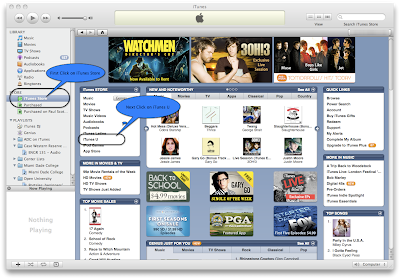
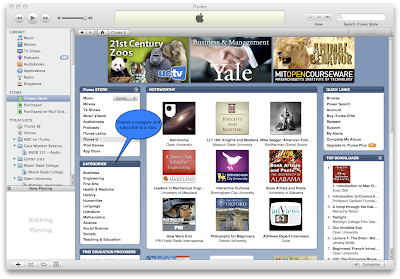
Now you are off and learning form the top teachers and some of the top schools in the country from the comfort of your own home and it is totally free. This is great for kids to discover new interests and get ahead in school.
Wednesday, August 19, 2009
Is Apple Big Brother? Reality Check

In an email this past week Jason Calicanis wrote a Case Against Apple in Five Parts detailing where Apple is going wrong as a closed platform and how their control of the platform can ultimately hurt them. This got a lot of email sent to Jason, some agreeing and others well let's just say vehemently disagreeing. I am a fan of Apple but folks there is no need to be ugly about it when someone expresses an opinion on how Apple might improve.
In addition to those emails Techcruch and The Daily Beast have both run stories about both Jason's email and the responses. So I thought this week I would wade into the discussion with a few thoughts of my own.
Jason stated since the love affair was over he was going to buy a Zune. Here is my question to Jason. Isn't the Zune less open and ultimately more expensive than the iPod? First if you want to use the Zune you have to use the Zune 3.0 app to sync your Zune with your computer. The Zune software only works on Windows XP Sp2 and higher. No Macs, no Linux, are even welcome on the Zune without the use of Parallels, VMWare, or some other Virtual Machine Application and Windows. As iTunes runs on both Mac and Windows it seems as though the iPod is more open than the Zune.
Still most people just don't seem to care for the Zune even with the Social features it has that iPod doesn't. The iPod is still selling millions and the Zune is only about 3% of MP3 sales.
On the Mac OS the thing that has made the OS so stable and rock solid for years is the fact Apple has kept tight control over both the hardware and the software. By doing that software developers new pretty much what they were righting their software for and the OS developers new they only had a few types of hardware devices to worry about so making things integrate tightly and be stable was a fairly easy task.
Anyone who has worked on Windows knows that sometimes adding a sound card or other peripheral could cause unexpected results once the drivers were loaded. Microsoft is even starting to deal with that issue requiring drivers to be signed in Windows 7 and device manufactures have to pay to get their drivers signed. A great way for Microsoft to make more money and finally force manufactures into some sort of standard to reduce the number of issues they have with their operating system.
I argued in a blog post in 2002 that Apple should make an Intel version of OS X. Of course I didn't know then they already were in preparation for a transition to move their hardware to Intel. I thought they should be doing it and still controlling the experience by partnering with Dell, HP, and others allowing them to build their brand to an Apple spec and allow those machines to run OS X.
This would allow more people to use OS X and increase its market penetration and let the other manufactures benefit from Apple's design. People who are going to buy Macs aren't going to stop but their might be some lower end markets that are still untapped because they can't or won't spend $1000 on a laptop or desktop computer. Apple could still make money off the OS license and make it a little easier for people to make the leap to OS X. Plus pushing more OS X installs out their make for a larger install base for developers to write software too. It is a win/win for everyone.
But Apple is a hardware company that uses software as a value add to sell their hardware so I don't see them doing that any time soon. I wish they would but it just isn't likely to happen. Plus Atari made the mistake of opening up their platform to anyone who wanted to write a game for the platform and ended up with some low quality unreliable games and the console took the criticism for it. Ultimately Atari went away and every console manufacturer since has kept very tight control over who is allowed to distribute games to avoid the same fate as Atari. Apple by comparison has been very open allowing anyone to produce apps for the computer, but keeping a tighter control on the phone.
The iPhone while having a tightly controlled ecosystem of Apps it has the largest ecosystem of Apps of any smart phone. The device has gone from non-existent 3 1/2 years ago to a Gartner Group estimate of 13% of smart phones in just that time and still growing by leaps and bounds. Do we love everything that is being done? Of course not. We want Apple to end the exclusivity agreement with AT&T which has been a hallmark of the American cellphone market for more than a decade and allow users choice of network. Many European countries have been doing this for years and our own FCC is finally looking into the practice to determine if it is harmful to customers. The answer is in short yes it is. Handset manufactures have been largely forced to hobble their devices and stifle innovation because the carriers didn't want devices on their network that might tax it or force them to upgrade the network to keep up with changing demands.
Apple is getting a lot of heat over the rejection of the Google Voice Application which is what has touched off this firestorm. Apple has been fairly arbitrary in accepting and rejecting Apps on the App Store for some time and with no real good reasons ever given. It leaves one to wonder how much of the seemingly arbitrary decisions are Apple's and how much is it a contractual obligation with AT&T?
I would like to see Apple more open and continue their expanded market penetration. It is good for us that already use Mac OS and will push companies that only develop for Windows to start thinking about both. I have clients in Real Estate and Accounting that struggle with large companies not making websites or software that work on anything but older versions of Windows or older Internet Explorer Web Browsers. Larger market share will inevitably lead to these companies innovating and creating apps that will work on Windows or Mac and creating websites that are not hooked into a particular browser. Historically Microsoft has been the big brother anti-competitive company who has created methods to tie people into one browser, one OS and it is coming back to bite them and their customers. How many people are stuck running IE 6 because one website won't allow them to upgrade?
Is Apple Big Brother yet? No, they have the potential to someday maybe. However I hope by then they will not feel the need and allow users to tweak and customize their devices as much as they can their OS. OS X is very configurable to look and feel how a user wants to make it look and feel. Maybe once AT&T is just a player in the larger iPhone ecosystem we will see the iPhone move the same direction as OS X in terms of the variety of apps a user wants and the kind of experience a user wants. Does the user want the Apple preferred I don't have to think about my device and just use it experience or the hacker let me tweak, customize, and see what I can make it do experience?
One thing is for certain cellular networks will have to look at protecting their network from the network side and stop meddling in our handsets. Thanks to Apple that trend is starting slowly.
Tuesday, August 4, 2009
Apple Genius Support
Today I am going to tackle a tech topic that is frequently overlooked. Everyone has computer issues from time to time and need assistance from the vendor. The question is how well does the vendor respond?
My Airport Extreme base station stopped working preventing me from using AirDisk to backup my laptop. I first tried switching out the hard drive with another one and it wouldn't mount. Next I took the drive that was in the Airport and plugged it into my laptop and it did work. So I was able to determine it was likely the USB port.
I dropped by the Apple Store and asked if a Genius could take a look. Unfortunately that store was full for the day but they scheduled me an appointment later in the day at another Apple Store in town. So I returned later to the other store and explained to the Genius everything I had done on my own to diagnose and he said sounds like a dead USB port to us as well. I had already tried everything they would of tried.
So he took my Airport went to his computer and started processing the replacement request. The good news while I have had the Airport for a couple of years they were going to replace it free of charge. I fortunately have Apple Care on my laptop which extends coverage to all Apple Monitors and Apple peripherals while the laptop or desktop is covered.
The good news was Apple was replacing my hobbled Airport, the bad news they didn't have my model in stock and it would be a couple of days. I asked the Genius if there was anything he could do, without my Airport my phones at home don't work more than one laptop can't easily be connected to the network etc. He suggested buying a new unit and just return it in a couple of days when mine comes in. I told him I didn't care for the solution because it just felt wrong to me to do that. It costs me money up front and when I return it Apple has to refurbish it and sell it for less money. So he said he would see what else he can come up with.
A few minutes later after talking to the manager he came back and said he would just give me the newer model to replace my older model unit. He took one off the shelf unboxed it and traded me my old unit for a newer model unit.
This is not the first trip to the Apple Genius Bar where they have taken such good care of me. A few years ago my iPod died right before a trip out of town and it would be miserable to fly across country without my iPod to listen to on the trip. So the Genius saw I had a dead hard drive and that model was no longer stocked so they bummed me up to a newer model classic and sent me on my way.
I can't stress enough how beneficial the Apple Care warranties are to extend the warranty of any device you own from Apple and if you go in and stay calm and polite how willing the Apple staff is to make your experience as painless as possible and sometimes you only have to ask them to help you out and they can go that extra mile to make your experience a pleasant one.
The nicer you are to them the more likely they are to use that extra discretion Apple gives their employees to make you a happy customer.
I do recommend going on to http://www.apple.com/retail/geniusbar/ and schedule a reservation so you can reduce your wait time when you go to the store.
Will Microsoft be able to offer this sort of experience with its retail stores when they start opening around the country? Tell me what you think here.
My Airport Extreme base station stopped working preventing me from using AirDisk to backup my laptop. I first tried switching out the hard drive with another one and it wouldn't mount. Next I took the drive that was in the Airport and plugged it into my laptop and it did work. So I was able to determine it was likely the USB port.
I dropped by the Apple Store and asked if a Genius could take a look. Unfortunately that store was full for the day but they scheduled me an appointment later in the day at another Apple Store in town. So I returned later to the other store and explained to the Genius everything I had done on my own to diagnose and he said sounds like a dead USB port to us as well. I had already tried everything they would of tried.
So he took my Airport went to his computer and started processing the replacement request. The good news while I have had the Airport for a couple of years they were going to replace it free of charge. I fortunately have Apple Care on my laptop which extends coverage to all Apple Monitors and Apple peripherals while the laptop or desktop is covered.
The good news was Apple was replacing my hobbled Airport, the bad news they didn't have my model in stock and it would be a couple of days. I asked the Genius if there was anything he could do, without my Airport my phones at home don't work more than one laptop can't easily be connected to the network etc. He suggested buying a new unit and just return it in a couple of days when mine comes in. I told him I didn't care for the solution because it just felt wrong to me to do that. It costs me money up front and when I return it Apple has to refurbish it and sell it for less money. So he said he would see what else he can come up with.
A few minutes later after talking to the manager he came back and said he would just give me the newer model to replace my older model unit. He took one off the shelf unboxed it and traded me my old unit for a newer model unit.
This is not the first trip to the Apple Genius Bar where they have taken such good care of me. A few years ago my iPod died right before a trip out of town and it would be miserable to fly across country without my iPod to listen to on the trip. So the Genius saw I had a dead hard drive and that model was no longer stocked so they bummed me up to a newer model classic and sent me on my way.
I can't stress enough how beneficial the Apple Care warranties are to extend the warranty of any device you own from Apple and if you go in and stay calm and polite how willing the Apple staff is to make your experience as painless as possible and sometimes you only have to ask them to help you out and they can go that extra mile to make your experience a pleasant one.
The nicer you are to them the more likely they are to use that extra discretion Apple gives their employees to make you a happy customer.
I do recommend going on to http://www.apple.com/retail/geniusbar/ and schedule a reservation so you can reduce your wait time when you go to the store.
Will Microsoft be able to offer this sort of experience with its retail stores when they start opening around the country? Tell me what you think here.
Wednesday, July 22, 2009
Is Your Mac Ready for Snow Leopard?
So with Snow Leopard just over two months away is your Mac ready? Apple's guidelines for the new OS are fairly simple. Your Mac must have an Intel Processor, 1 Gigabyte of RAM, 5 Gigabytes of free disk space, and a DVD drive to install the disk.
All Intel Macs sold from May 2006 on are all able to run Snow Leopard. Depending on how old your machine is will determine the number new features which you can take advantage. For instance the first Macbooks, and iMacs sold from May - Nov of 2006 had Intel Core Duo Processors which had 32 bit CPU's. You can install and run Snow Leopard and you will get a performance gain but you will not get as dramatic a gain as you would on a 64 bit Mac sold after November 06 which was designated as a Intel Core 2 Duo. The Mac-mini was Intel Core Solo and Core Duo from May 2006 - August 2007.
To check which Processor you have in your computer Click on your Apple Menu, go to About This Mac, and look at the Processor line. If you have PowerPC you can not upgrade to 10.6 Snow Leopard. If you have an Intel Core Duo or Core Solo you can run the upgrade but can't take full advantage of the new 64 bit system.
Also on the next line down it will tell you how much RAM you have in your system remember 1 gig is the minimum. RAM is cheap now and upgrades are fairly simple on most Macs. I would recommend putting in as much RAM as your system can support and you can afford. You can never have too much RAM.
Hard Drive space is important. You need to have at least 5 Gigabytes free to do the installation but once the installation is done you will recover some space on your hard drive. According to Apple’s Specs possibly as much as 6 Gigabytes. Once this is done you can also use a program like Drive Genius 2 to remove the PowerPC code from your Applications and save more space.
Hard Drives are not that expensive anymore and hard drive upgrades on the Mac are fairly straight forward. The newer Macbooks and Macbook Pros pre Uni-body model have a lot of screws to remove to get to the hard drive so be careful and make sure you keep track of the screws. I will cover hard drive replacement in a future post.
For those with Macs that are pre Uni-body it seems the only feature we don't get with Snow Leopard is hardware H.264 decoding. The CPU can handle the decoding but hardware decoders are always more efficient and free up your CPU for other tasks.
For all Intel users this is going to be a good upgrade for improving performance in virtually every area of the system and making small visual enhancements. This is a bargain for the $29.00 price tag as well as getting us ready for whatever Apple has in store for us next with 10.7. in the next 18-24 months after Snow Leopard ships.
If you are on a PowerPC system and are starting to think about an upgrade of your Macbook, Macbook Pro, or Mac-Mini, or PowerMac computer now is the time! The Snow Leopard upgrade will only cost you 9.95 and you can start enjoying the added performance from the newer video cards, faster CPU's, and larger Hard Drives.
If you are on an PowerPC iMac I would wait until after October to upgrade. The rumor is new iMacs will be coming soon and then your machine will ship with Snow Leopard.
All Intel Macs sold from May 2006 on are all able to run Snow Leopard. Depending on how old your machine is will determine the number new features which you can take advantage. For instance the first Macbooks, and iMacs sold from May - Nov of 2006 had Intel Core Duo Processors which had 32 bit CPU's. You can install and run Snow Leopard and you will get a performance gain but you will not get as dramatic a gain as you would on a 64 bit Mac sold after November 06 which was designated as a Intel Core 2 Duo. The Mac-mini was Intel Core Solo and Core Duo from May 2006 - August 2007.
To check which Processor you have in your computer Click on your Apple Menu, go to About This Mac, and look at the Processor line. If you have PowerPC you can not upgrade to 10.6 Snow Leopard. If you have an Intel Core Duo or Core Solo you can run the upgrade but can't take full advantage of the new 64 bit system.
Also on the next line down it will tell you how much RAM you have in your system remember 1 gig is the minimum. RAM is cheap now and upgrades are fairly simple on most Macs. I would recommend putting in as much RAM as your system can support and you can afford. You can never have too much RAM.
Hard Drive space is important. You need to have at least 5 Gigabytes free to do the installation but once the installation is done you will recover some space on your hard drive. According to Apple’s Specs possibly as much as 6 Gigabytes. Once this is done you can also use a program like Drive Genius 2 to remove the PowerPC code from your Applications and save more space.
Hard Drives are not that expensive anymore and hard drive upgrades on the Mac are fairly straight forward. The newer Macbooks and Macbook Pros pre Uni-body model have a lot of screws to remove to get to the hard drive so be careful and make sure you keep track of the screws. I will cover hard drive replacement in a future post.
For those with Macs that are pre Uni-body it seems the only feature we don't get with Snow Leopard is hardware H.264 decoding. The CPU can handle the decoding but hardware decoders are always more efficient and free up your CPU for other tasks.
For all Intel users this is going to be a good upgrade for improving performance in virtually every area of the system and making small visual enhancements. This is a bargain for the $29.00 price tag as well as getting us ready for whatever Apple has in store for us next with 10.7. in the next 18-24 months after Snow Leopard ships.
If you are on a PowerPC system and are starting to think about an upgrade of your Macbook, Macbook Pro, or Mac-Mini, or PowerMac computer now is the time! The Snow Leopard upgrade will only cost you 9.95 and you can start enjoying the added performance from the newer video cards, faster CPU's, and larger Hard Drives.
If you are on an PowerPC iMac I would wait until after October to upgrade. The rumor is new iMacs will be coming soon and then your machine will ship with Snow Leopard.
Saturday, July 18, 2009
Mac OS X Under the Hood
Mac OS X Snow Leopard as a mentioned in a previous post (see New Features In Mac OS X 10.6 Coming Soon) we talked about a few of the new features of OS X 10.6 that users will be able to see. Today we are going to talk about what you will not see. Those tweaks and changes under the hood that will make OS X easier to use and faster.
First I should mention in the MWDC 2009 Keynote Phil Schiller noted that the new Snow Leopard would take up less space. With the upgrade the average user should recover about 6 Gigabytes of disk space. I think this is the first Operating System upgrade that actually makes the OS smaller. Due to the lack of Power PC support in this version only Intel machines built in the last few years will be able to run the upgrade and large chunk of the space saved probably comes from removing the old Power PC code from the Operating System.
First and foremost on the behind the scenes changes is Finder is completely rewritten in Cocoa and 64 bit. This means the Finder the first app that launches and gives you access to your files is going to be much faster and more stable. Some of the early indications from Apple indicates it will be on average twice as fast if not a little faster than that.
Making Time Machines twice a fast, for those of you not using Time Machine for backup yet I can't stress enough what a great job it can do of saving you from hardware failures or from accidental deletions or overwrites of files. I have used Time Machine a lot in the past couple of years to recover documents or rebuild whole systems and it has never failed me.
Snow Leopard is also promising faster wake up from sleep, faster shutdown and faster to join networks. This saves time at the beginning and end of your work time with your Mac.
Snow Leopard is also adding a great feature for travelers. The computer can now determine what time zone it is located in and update it's clock automatically using the Internet and Geo Location technologies. Now when you are flying across country your computer can know the local time when you arrive.
Better support for selecting text in PDF's has now been added so if you have a two column document the computer can select the left column first and the right column after making it easier to copy information from one document to another.
Disk Eject now will tell you if a disk can't be ejected what Application is using the disk so you can close it and then eject your disk.
iChat now allows higher resolution video conferencing with reduced bandwidth cost, a 33% reduction in bandwidth requirements makes it easier to use higher resolutions and continue to do other things on the Internet at the same time.
Other things that users will not see is Grand Central Dispatch and Open CL. These two technologies allow programmers to write apps to take better advantage of the modern multi-core processors in the entire Intel Mac line and Open CL allows programmers to use powerful Graphics Processors to do regular CPU tasks. This allows the Operating System to better utilize the powerful hardware we already have.
Also to make Snow Leopard a better corporate citizen they are now including Exchange Support in Mail, Address Book, and iCal. Now we can use the apps we have known and loved for years with Exchange servers. Allowing users to keep all of our email, contacts, and calendars in one place regardless if the data lives on our Mobile Me or Exchange accounts.
The best news for users of OS X 10.5 Leopard the upgrade is only going to cost $29 and if you bought a Mac after Jun 11th the cost of upgrade is only $10. This is great bargain for everything that is coming with the new version of OS X. Come the end of September Mac users will certainly be seeing a Leopard of another color.
First I should mention in the MWDC 2009 Keynote Phil Schiller noted that the new Snow Leopard would take up less space. With the upgrade the average user should recover about 6 Gigabytes of disk space. I think this is the first Operating System upgrade that actually makes the OS smaller. Due to the lack of Power PC support in this version only Intel machines built in the last few years will be able to run the upgrade and large chunk of the space saved probably comes from removing the old Power PC code from the Operating System.
First and foremost on the behind the scenes changes is Finder is completely rewritten in Cocoa and 64 bit. This means the Finder the first app that launches and gives you access to your files is going to be much faster and more stable. Some of the early indications from Apple indicates it will be on average twice as fast if not a little faster than that.
Making Time Machines twice a fast, for those of you not using Time Machine for backup yet I can't stress enough what a great job it can do of saving you from hardware failures or from accidental deletions or overwrites of files. I have used Time Machine a lot in the past couple of years to recover documents or rebuild whole systems and it has never failed me.
Snow Leopard is also promising faster wake up from sleep, faster shutdown and faster to join networks. This saves time at the beginning and end of your work time with your Mac.
Snow Leopard is also adding a great feature for travelers. The computer can now determine what time zone it is located in and update it's clock automatically using the Internet and Geo Location technologies. Now when you are flying across country your computer can know the local time when you arrive.
Better support for selecting text in PDF's has now been added so if you have a two column document the computer can select the left column first and the right column after making it easier to copy information from one document to another.
Disk Eject now will tell you if a disk can't be ejected what Application is using the disk so you can close it and then eject your disk.
iChat now allows higher resolution video conferencing with reduced bandwidth cost, a 33% reduction in bandwidth requirements makes it easier to use higher resolutions and continue to do other things on the Internet at the same time.
Other things that users will not see is Grand Central Dispatch and Open CL. These two technologies allow programmers to write apps to take better advantage of the modern multi-core processors in the entire Intel Mac line and Open CL allows programmers to use powerful Graphics Processors to do regular CPU tasks. This allows the Operating System to better utilize the powerful hardware we already have.
Also to make Snow Leopard a better corporate citizen they are now including Exchange Support in Mail, Address Book, and iCal. Now we can use the apps we have known and loved for years with Exchange servers. Allowing users to keep all of our email, contacts, and calendars in one place regardless if the data lives on our Mobile Me or Exchange accounts.
The best news for users of OS X 10.5 Leopard the upgrade is only going to cost $29 and if you bought a Mac after Jun 11th the cost of upgrade is only $10. This is great bargain for everything that is coming with the new version of OS X. Come the end of September Mac users will certainly be seeing a Leopard of another color.
Subscribe to:
Posts (Atom)
Apple TV
The more I use the new Apple TV the more I like it. The previous model was likable and easy to use but we had no options for live content. N...
-
 My consulting business has been growing and people are starting to ask if they can pay by credit card. I had a system I setup in 2012 but o...
 -
Normally I just focus on Mac and iPhone tech. However I ran into this problem yesterday and spent hours looking for a solution so I thought...