|
Tuesday, April 10, 2012
4/7 TechBits Podcast


Sunday, March 25, 2012
Yoink! Reviewed
 Yoink is a tiny app with a big place in my work flow. As applications go Yoink doesn’t do much but it is now something I recommend to everyone who uses Lion and likes running apps in Full Screen mode. To use Yoink simply download it from the App Store for the low price of $2.99 and launch it. I can’t stress enough you should put this in your login items so it starts every time you startup your Mac.
 When you grab a file from your desktop or from Mail in full screen mode or anyplace where you click and drag a file a gray box will appear on the portion of the screen you designate in Yoink’s preferences. Drag the file to the gray box and Yoink will hold it for you while you move to different desktops or to different full screen apps. Then just grab the file and drag it to the app you want to use the file on.
For example you are working in email full screen and someone sends you a file attachment in Mail. Drag the file attachment to Yoink and move to the screen you want to use the file attachment on. Say you are going to your main desktop and dropping a photo on Pixelmator to do some editing. Once on your desktop just grab the file from Yoink and drop it on the Pixelmator icon.
Yoink even had a quick look button so you can preview your document if you have more than one being held by Yoink. Once you clear your files out of Yoink it quietly disappears. You can even set how long you want the window to appear when you grab a file. I opted to stick with the default 5 seconds.
The only thing I would change about Yoink is you only get two choices where to put the Yoink dock. Center left or Center right. I would love to be able to put it at the top, middle, or bottom of the sides of the desktop. Yoink was updated after I had written this to include additional positions for the Yoink Window. Top and bottom of the screen is now available! Great job and this is an app I can truly no longer live without. Everything else about this app is a perfect addition to my workflow as I start using more and more apps in full screen modes, Yoink will be the one application I absolutely cannot live without.
Note: The text in blue was added after the initial review was released.
Tuesday, March 20, 2012
The New iPad
 The iPad is just starting its third year on the market and now the third iteration of the hottest tablet computer in the world. At first glance this revised iPad may seem a little ho-hum. But after a weekend of using it, I just can’t get over how amazing the graphics look. iOS 5 has made this not just a content consumption device but has made this a device that is just as capable at creating content. For most users they may not even need a laptop anymore.
In the announcement just over a week ago, Apple announced they had sold more iPads than HP, Dell, or Lenovo sold computers. This device is perfect for reading email, reading books, watching movies on the go, and creating content.
Equipped with a 42 watt hour battery almost double the battery of the previous generation we still get 10 hours on wifi or 9 hours on 4G. It does take longer to recharge this much larger battery. I just toss it not he charger when I am at my desk or whenever I think about it. I don’t want it to run totally dead anymore due to the amount of time recharging takes. For the enhanced graphics of the retina display and performance of the quad core graphics it is totally worth it.
The Retina display is just stunning making movies look crystal clear on the 9.7” display. Text looks as sharp as a printed page. You truly have to hold on in your hand and use apps that are designed with the new retina display in mind.
The camera while most people might feel silly holding up the iPad to take a picture has an astounding camera. Great if you are caring it along and you need to take a quick shot. The large screen really shows you immediately the quality of your image in a way a small screen on a pocket camera or smart phone just can’t seem to quiet capture. Who hasn’t taken a picture and thought it looked good on the camera screen or smart phone screen, only to load it on your computer and find something wrong with it? The lens process designed for the iPhone 4S paired with a 5 megapixel sensor makes just magnificent images.
Since the device is only 1mm thicker than the iPad 2 existing cases will still work with the tablet so there is no need to give up your favorite case to upgrade to the new iPad. Apple also delighted the press by announcing the 16 GB iPad 2 will be sticking around at a lower price point. People buying their first iPad can now get one for $350.00. I think this will pretty well kill most of the Android tablets slated to come out this year. If Apple shaved another hundred off the price they could likely kill off the Nook, and Fire tablets while they were at it.
Don’t get me wrong I want to see other tablets in the market and would like to see them do well. It pushes Apple to keep innovating and making a better tablet for those of us who use them. I am just not sure any other tablet maker has something ready that can compete with it.
The 4G LTE chipset is smoking fast with 10MB down and 5MB up speeds on Verizon. In a series of surprise tweets over the weekend I was pleased to learn that if you buy an AT&T or Verizon iPad you are not stuck with that carrier. A simple microSIM swap and you can use either carrier. If you happen to travel to Europe you will be relegated to 3G speeds since Europe’s LTE network uses different bands requiring different chips. Hopefully someone will come up with a Global Chip that can handle them all to solve that, perhaps in a future iPad.
In a test a few weeks ago I attempted to spend an entire work day while traveling to just spend it on my iPad and not breakout the laptop computer. I found that on the iPad 2 I was able to work a little over a 10 hour day. Keep up with my email, configure about a dozen airport extremes, remote control several computers, update support tickets, have a few Skype calls, do some writing, and iMessage with several people all throughout the day and had no problem doing it. Once I mastered the four finger swipe left and right to jump between apps or the four finger swipe up to select an app that was used several app switches ago, I got quiet quick at moving around and was able to get a lot of work done. WIth more AirPrint printers being made I was even able to print documents without my computer. During one trip the hotel printer on the wireless network had AirPrint and I was able to print my boarding pass right to it with no hassles at all. I was able to go the whole day without my laptop. With the new iPad this should be even easier.
As far as early reports of heating is concerned, I haven’t noticed a problem. I don’t play a lot of games on my iPad and when I do they tend to be casual games and not particularly graphics intensive. I may pick up a game for testing purposes of course and see if it really does heat up. But I have not yet noticed any such problem under normal usage in average temperature conditions.
So I would say the new iPad is a hit and Apple’s numbers today seemed to prove it. Over three million iPad’s sold on the opening weekend and availability in more countries in the next couple of weeks. It seems Apple is poised to break more records yet.
If you have an iPad 2 don’t worry. Unless you want the higher resolution screen or LTE network capability the iPad 2 is still supported and should remain popular at the lower price for a long time. The original iPad is still supported but with only 128MB of RAM may start seeming sluggish as newer apps demand more memory. So if you are on the iPad 1 this might be a good time to think about upgrading. If you are on the iPad 2 you could give it another year if you aren’t particularly eager for the new features.
Overall I am extremely pleased with my new iPad and look forward to what other announcements Apple has up their sleeves for us next.
One parting question for my readers today. How do you use your iPad? Is it a work tool? It is a toy? Does it replace your laptop? Feel free to leave your comments in the comments field below.
3/20 TechBits Podcast
|
Monday, January 2, 2012
Lark Un-Alarm Clock
For the last couple of weeks I have been testing out the Lark Un-Alarm clock. This alarm clock consists of an iPhone app, a sensor and a wrist strap. Before going to bed simply pull the sensor from the charging dock, slip it in to the soft wrist band, open your iPhone app and set what time you want to be woke up. That is all there is to it for the alarm function. The advantage for those users who are not single it provides a silent alarm for waking you without disturbing your partner. I get the feeling this will be a popular gift for people who have to wake up early when they have a partner who doesn’t.
The sensor vibrates at wakeup time using a random pattern so you do not get used to it. Once you are awake just grab your iPhone and slide to turn off the alarm. Don’t worry if you are conceded you might take the Lark off in your sleep. The alarm has a backup audible alarm that causes your iPhone to emit soothing sounds to ease you back to consciousness if you do not turn off the vibrating alarm in a certain time period.
One you turn off the alarm is where the Lark starts getting cool. The Bluetooth connection between your phone and the Lark sensor allows the Lark to upload information to your phone to tell you about how you slept. How long did it take to fall asleep? How many times did you wake up in the night? How many hours of sleep did you get? All of this information is recorded and stored in your phone. The when and how much you moved about is displayed on a graph at the bottom of the screen. So users can start building a history of their sleep patterns.
I didn’t sign up for the sleep coach since it was an extra $60.00 and I apparently am already a pretty good sleeper.
My first night with Lark wasn’t quite successful I didn’t realize for the device to monitor your sleep patterns you must setup a wake up time. So for those that like to sleep in on the weekends until your eyes roll open it will not track how you sleep on those nights. By the second night I set an alarm time which I woke up before I reached but because I spent a sufficient amount of time sleeping the Lark sensor uploaded my sleep information to my iPhone and told me about my quality of sleep. I was surprised to say the least at how the software evaluated my sleep and said I slept well. I always imagined I had difficultly sleeping but apparently I do not. I fall asleep fairly quickly and wake up several times in the night most of which I never even remember.
I have not been able to find technical details on how the sensor works. Based on it’s size and the sleeve it fits it in the wrist band I believe that it is an accelerometer that measures movement to determine if you are asleep or not.
So for the $129 price tag it is a worthwhile purchase if you have a partner who isn’t on your sleep schedule. However for me it seems just to be a high priced toy. The second downfall of this device is if you want the Sleep Coach it raises the price another $60.00. The sleep coach should just come with the device for the $129.00 price point. This is an expensive alarm clock when your smartphone or iPod Touch sold separately provides most of the intelligence. It is an interesting device and it is fun but I just can’t justify the $129.00 price tag. If you or your partner has to get up much earlier then it is a worth while investment.
Tuesday, August 23, 2011
Apple's cool is no liberal triumph
I was just reading about this on Salon.com today. I thought it was interesting although a tad flawed in reasoning. So I wrote a letter to the editor explaining where I think he went wrong.
The Salon article is available here and link to my letter to the editor below.
http://www.salon.com/technology/how_the_world_works/2011/08/23/apple_and_liberal_values/index.html
http://letters.salon.com/tech/htww/2011/08/23/apple_and_liberal_values/permalink/8ebb47008fa5d66431f8ea2a8e084667.html
Not a bad article but I don't totally agree
First Apple is forced to play the patent game or others will eat their lunch as is currently happening to Google. Google seemed to want to stay out of the patent game but after several court challenges went and bought Motorola undoubtedly for the patents.
As for Asian workers and plants there is not a computer company or a light bulb manufacturer that makes a product here. We don't make things in America anymore. Should it change why not it would be good for jobs but probably not good for low cost items like WalMart's bottom line. Are Americans willing to spend a little more for made in America on their consumer electronics? If they were businesses would be more likely to do it.
A company can be pro liberal and still make smart business decisions. Look take a look at where companies and individuals make political donations and that offers a lot of insight into their political leanings. Mostly liberal candidates you can bet the person or company leans liberal. Same for conservatives, if they split down the middle they are more interested in how government affects their business than their ideology.
Apple owes their success to innovating, to redefining the smartphone and the MP3 player, to building a better OS and sexier computer hardware. They also keeping inline with ideology found ways to make the computers greener using recyclable components and by insisting on better working conditions and pay for the people that make their hardware. When several suicides happened in a short period at the Foxconn plant Apple sent investigators to look into it and see what they could do to help.
Overall they are a company that tries to do the right thing and take care of their employees. Note when the earthquake in Japan occurred Apple stepped up to help their employees and families.
As to the companies software ecosystem, they make money on sales of apps they also shoulder the cost for bandwidth and credit card processing fees taking that off the shoulders of the small developer allowing smaller companies or individuals to publish apps. The vetting process for apps helps curtail malware from getting on smart phones and by building an integrated ecosystem it helps the end user by making sure things just work together. The Mac is stable because the company controls the hardware and the software.
—PaulTheMacGuyScott
Read PaulTheMacGuyScott's other letters
Permalink
Flag
The Salon article is available here and link to my letter to the editor below.
http://www.salon.com/technology/how_the_world_works/2011/08/23/apple_and_liberal_values/index.html
http://letters.salon.com/tech/htww/2011/08/23/apple_and_liberal_values/permalink/8ebb47008fa5d66431f8ea2a8e084667.html
Not a bad article but I don't totally agree
First Apple is forced to play the patent game or others will eat their lunch as is currently happening to Google. Google seemed to want to stay out of the patent game but after several court challenges went and bought Motorola undoubtedly for the patents.
As for Asian workers and plants there is not a computer company or a light bulb manufacturer that makes a product here. We don't make things in America anymore. Should it change why not it would be good for jobs but probably not good for low cost items like WalMart's bottom line. Are Americans willing to spend a little more for made in America on their consumer electronics? If they were businesses would be more likely to do it.
A company can be pro liberal and still make smart business decisions. Look take a look at where companies and individuals make political donations and that offers a lot of insight into their political leanings. Mostly liberal candidates you can bet the person or company leans liberal. Same for conservatives, if they split down the middle they are more interested in how government affects their business than their ideology.
Apple owes their success to innovating, to redefining the smartphone and the MP3 player, to building a better OS and sexier computer hardware. They also keeping inline with ideology found ways to make the computers greener using recyclable components and by insisting on better working conditions and pay for the people that make their hardware. When several suicides happened in a short period at the Foxconn plant Apple sent investigators to look into it and see what they could do to help.
Overall they are a company that tries to do the right thing and take care of their employees. Note when the earthquake in Japan occurred Apple stepped up to help their employees and families.
As to the companies software ecosystem, they make money on sales of apps they also shoulder the cost for bandwidth and credit card processing fees taking that off the shoulders of the small developer allowing smaller companies or individuals to publish apps. The vetting process for apps helps curtail malware from getting on smart phones and by building an integrated ecosystem it helps the end user by making sure things just work together. The Mac is stable because the company controls the hardware and the software.
—PaulTheMacGuyScott
Read PaulTheMacGuyScott's other letters
Permalink
Flag
Friday, August 5, 2011
The MacGuy visits a Microsoft Store
Much to the surprise and amusement to my readers I checked in on FourSquare from the Microsoft Store at the Mall of America stating I went into the store and didn’t burst into flames. For those of you who don’t know me personally but read my writing here and in Apple Spotlight Magazine and listen to the TechBits podcast may not know is that your friendly neighborhood Apple Certified Support Professional and other affiliations is a mild mannered Support Engineer by day supporting both Mac and PC and my alter ego is the MacGuy writer, podcaster, and general Apple fanboy by night. It is sort of like being a super hero without the cape.

We have all heard the news about Microsoft’s 11 Retail Stores and the stories about 45 more coming in the next year across the US except for Alaska. Well, on a recent trip to Minneapolis I decided to visit the Mall of America to visit the Microsoft Store and its arch rival the Apple Store just across the hall.
The look of the two stores is very similar downtown the liberal use of white walls and generous lighting and light wood tables. Microsoft does throw in some splashes of orange and video monitors that wrap around the store instead of putting up ad banners. The MS store employees where red shirts to the Apple Store employees use of blue. Apparently the Microsoft Store designers never watched Star Trek.
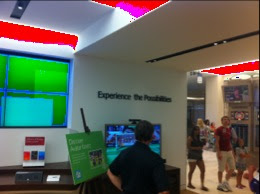
I did notice in the hour I was there no one walked out with any snazzy new Microsoft gear. In fact the employees seemed a tad distant and didn’t talk to me unless I approached them and asked questions. Since Microsoft doesn’t sell much hardware except for the Xbox and keyboards and mice the store is loaded with Sony, Dell, Asus, and a few off brand looking machines. The store was adorned with four Microsoft Surface tables. Not for sale that I could tell and not as impressive in real life as in the videos.

Overall it was a poor imitation of the Apple Store experience. Although lots of Xbox’s and Connect systems scattered through the store provided hours of entertainment to kids of all ages. I supposed it is cheaper than the arcade around the corner.
A Microsoft store employee who spoke to me on condition on anonymity confided in me when I asked about the striking similarities between themselves and store across the hall stated “We like to take something that obviously works well and improve upon it.” Later in our conversation this employee pointed out something missing from the Microsoft Windows 7 computers stating the “Microsoft makes a deal with all vendors that put hardware in our stores. No bloatware is allowed on these computers. These machines only have Microsoft Windows software on them and Microsoft security software nothing extra.” I will note one of the Asus tablets that converts into a laptop they were showing did feel very sluggish when using it and the similar tablet right next to it for a few hundred more was a much better performer. Even in the Microsoft store they allowed under powered hardware in that makes their software look bad. Incidentally that under powered hardware was still more expensive than a Macbook Air which is much faster and more usable.

Nothing in the Microsoft store I looked at came close to the usability of the iPad, the elegance and speed of a MacBook Air and notably missing from the line up of tables of gear was a selection of Windows Phones. Maybe I missed that section of the store. There was a large window display reminiscent of the iPhone displays with a LCD monitor turned on its side showing video of what an iPhone can do. They had the Microsoft version in the front window of the store but I never noticed phones out to be touched or used. Also conspicuously missing was MP3 players. I guess Microsoft figures those will never catch on.
Finally putting the Microsoft store across the isle from an Apple Store and this was not an accident all of the 11 Microsoft Stores are in close proximity to an Apple Store. Just seems to highlight the deficiencies in Microsoft’s strategy. The one winning product they have the XBox is relegated to the back of the store and looks more like an arcade than a retail store. The employees aren’t engaged and don’t feel like they really believe in what they are doing. It seems as though Microsoft thinks if they make themselves look like the Apple Store that one of two things might happen. Either one they will confuse would be consumers into walking into the Microsoft Store instead of the Apple Store and selling them a computer. Or two if they make themselves look as much like Apple as possible somehow that will make them magically hip and competition for Apple.
The problem is the PC industry engaged in a race to the bottom on price and innovation suffered. Since Microsoft doesn’t control the hardware at all it makes it impossible for them to move in the direction they want to go. Apple can and does tie the hardware and the software together tightly to make a great experience. Something Microsoft does not have enough control over their vendors to accomplish.
In short after spending time their I have to agree with an analysis of the Microsoft Store by John C. Dvorak the Microsoft store is not a good idea. It seems as though Apple is the only one who has figured out how to make the experience work. Did any of you ever visit a Gateway Country Store? There is something going on in Apple that isn’t easily duplicated. Like typing the hardware and software together to create an experience the Apple Stores are more than just the decor, the computers, and the staff. There is something very carefully planned a secret sauce that has made these stores wildly successful in a way no other PC manufacturer has been able to duplicate. When the Apple Stores first opened It was universally accepted they would suffer the same fate as Gateway Country. However they have grown and flourished into one of the most profitable retail spaces on a per square foot basis. It is amazing.
For those wondering when I left the Microsoft Store I did walk straight over to the Apple Store to get a refill of that upbeat Apple energy and the force was in balance and all was right with the world again.
We have all heard the news about Microsoft’s 11 Retail Stores and the stories about 45 more coming in the next year across the US except for Alaska. Well, on a recent trip to Minneapolis I decided to visit the Mall of America to visit the Microsoft Store and its arch rival the Apple Store just across the hall.
The look of the two stores is very similar downtown the liberal use of white walls and generous lighting and light wood tables. Microsoft does throw in some splashes of orange and video monitors that wrap around the store instead of putting up ad banners. The MS store employees where red shirts to the Apple Store employees use of blue. Apparently the Microsoft Store designers never watched Star Trek.
I did notice in the hour I was there no one walked out with any snazzy new Microsoft gear. In fact the employees seemed a tad distant and didn’t talk to me unless I approached them and asked questions. Since Microsoft doesn’t sell much hardware except for the Xbox and keyboards and mice the store is loaded with Sony, Dell, Asus, and a few off brand looking machines. The store was adorned with four Microsoft Surface tables. Not for sale that I could tell and not as impressive in real life as in the videos.
Overall it was a poor imitation of the Apple Store experience. Although lots of Xbox’s and Connect systems scattered through the store provided hours of entertainment to kids of all ages. I supposed it is cheaper than the arcade around the corner.
A Microsoft store employee who spoke to me on condition on anonymity confided in me when I asked about the striking similarities between themselves and store across the hall stated “We like to take something that obviously works well and improve upon it.” Later in our conversation this employee pointed out something missing from the Microsoft Windows 7 computers stating the “Microsoft makes a deal with all vendors that put hardware in our stores. No bloatware is allowed on these computers. These machines only have Microsoft Windows software on them and Microsoft security software nothing extra.” I will note one of the Asus tablets that converts into a laptop they were showing did feel very sluggish when using it and the similar tablet right next to it for a few hundred more was a much better performer. Even in the Microsoft store they allowed under powered hardware in that makes their software look bad. Incidentally that under powered hardware was still more expensive than a Macbook Air which is much faster and more usable.
Nothing in the Microsoft store I looked at came close to the usability of the iPad, the elegance and speed of a MacBook Air and notably missing from the line up of tables of gear was a selection of Windows Phones. Maybe I missed that section of the store. There was a large window display reminiscent of the iPhone displays with a LCD monitor turned on its side showing video of what an iPhone can do. They had the Microsoft version in the front window of the store but I never noticed phones out to be touched or used. Also conspicuously missing was MP3 players. I guess Microsoft figures those will never catch on.
Finally putting the Microsoft store across the isle from an Apple Store and this was not an accident all of the 11 Microsoft Stores are in close proximity to an Apple Store. Just seems to highlight the deficiencies in Microsoft’s strategy. The one winning product they have the XBox is relegated to the back of the store and looks more like an arcade than a retail store. The employees aren’t engaged and don’t feel like they really believe in what they are doing. It seems as though Microsoft thinks if they make themselves look like the Apple Store that one of two things might happen. Either one they will confuse would be consumers into walking into the Microsoft Store instead of the Apple Store and selling them a computer. Or two if they make themselves look as much like Apple as possible somehow that will make them magically hip and competition for Apple.
The problem is the PC industry engaged in a race to the bottom on price and innovation suffered. Since Microsoft doesn’t control the hardware at all it makes it impossible for them to move in the direction they want to go. Apple can and does tie the hardware and the software together tightly to make a great experience. Something Microsoft does not have enough control over their vendors to accomplish.
In short after spending time their I have to agree with an analysis of the Microsoft Store by John C. Dvorak the Microsoft store is not a good idea. It seems as though Apple is the only one who has figured out how to make the experience work. Did any of you ever visit a Gateway Country Store? There is something going on in Apple that isn’t easily duplicated. Like typing the hardware and software together to create an experience the Apple Stores are more than just the decor, the computers, and the staff. There is something very carefully planned a secret sauce that has made these stores wildly successful in a way no other PC manufacturer has been able to duplicate. When the Apple Stores first opened It was universally accepted they would suffer the same fate as Gateway Country. However they have grown and flourished into one of the most profitable retail spaces on a per square foot basis. It is amazing.
For those wondering when I left the Microsoft Store I did walk straight over to the Apple Store to get a refill of that upbeat Apple energy and the force was in balance and all was right with the world again.
When Nerds Give Back!
Recently the following article was posted on my companies web page. Visit http://www.augustjackson.com/our-space to read this article and the musings of my other co-workers and check out our companies new web site, it is really stunning!
 Like other programs such as Teach for America or Americorps Code for America is a way for Technologists, and other IT people to give back using our unique talents to help governments be more efficient and connected with its citizens.
By pairing city governments with technology people to develop scalable solutions to improve government transparency and communication, replace outdated technology with modern Web 2.0 technology.
Code for America is working to create open source software repositories so governments can share code and solutions to help them integrate platforms, reduce costs, and eliminate redundancy.
Geeks like to solve problems and create new software. So using those talents to serve the community is away for another group of Americans to give back to the community. Government has been historically slow to change and adopt new technology that businesses have used for years to remain competitive.
Code for America gives city governments a chance to catchup with larger organizations with bigger budgets and more human resources without having to spend the money.
Currently the city of Chicago is a finalist for the 2012 Code For America Fellowship to update the 311 system in Chicago. Making it more than just a phone based service to contact city government services. Open311 will extend the existing 311 service to the web and allow citizens to contact government services and track status updates through the web and smartphones.
Freedom Speaks LLC has created a program called City 311 that runs on Windows Phones, Android, iOS, and Blackberry and the web. Allowing participating city governments to receive reports from citizens for graffiti removal, report potholes, request bulky trash pickup, report illegal dumping, street light outages, or virtually anything else that might need to be reported to a city government. Allowing this to be done electronically of course makes it more efficient since someone isn’t required to be on the phone to take the report. The appropriate department can get the dispatch right away and the citizen can get feedback on the status of the report. Making us all just a little more connected.
Check out Code For America at www.codeforameica.com or take a look at the City 311 app on your smartphone or www.citysourced.com.
Like other programs such as Teach for America or Americorps Code for America is a way for Technologists, and other IT people to give back using our unique talents to help governments be more efficient and connected with its citizens. By pairing city governments with technology people to develop scalable solutions to improve government transparency and communication, replace outdated technology with modern Web 2.0 technology.
Code for America is working to create open source software repositories so governments can share code and solutions to help them integrate platforms, reduce costs, and eliminate redundancy.
Geeks like to solve problems and create new software. So using those talents to serve the community is away for another group of Americans to give back to the community. Government has been historically slow to change and adopt new technology that businesses have used for years to remain competitive.
Code for America gives city governments a chance to catchup with larger organizations with bigger budgets and more human resources without having to spend the money.
Currently the city of Chicago is a finalist for the 2012 Code For America Fellowship to update the 311 system in Chicago. Making it more than just a phone based service to contact city government services. Open311 will extend the existing 311 service to the web and allow citizens to contact government services and track status updates through the web and smartphones.
Freedom Speaks LLC has created a program called City 311 that runs on Windows Phones, Android, iOS, and Blackberry and the web. Allowing participating city governments to receive reports from citizens for graffiti removal, report potholes, request bulky trash pickup, report illegal dumping, street light outages, or virtually anything else that might need to be reported to a city government. Allowing this to be done electronically of course makes it more efficient since someone isn’t required to be on the phone to take the report. The appropriate department can get the dispatch right away and the citizen can get feedback on the status of the report. Making us all just a little more connected.
Check out Code For America at www.codeforameica.com or take a look at the City 311 app on your smartphone or www.citysourced.com.
Subscribe to:
Posts (Atom)
Apple TV
The more I use the new Apple TV the more I like it. The previous model was likable and easy to use but we had no options for live content. N...
-
 My consulting business has been growing and people are starting to ask if they can pay by credit card. I had a system I setup in 2012 but o...
 -
Normally I just focus on Mac and iPhone tech. However I ran into this problem yesterday and spent hours looking for a solution so I thought...